EPF Date of 2026: How Employers Can Update & Correct DOE
The Date of Exit (DOE) is an important part of an employee’s EPF service record. When an employee leaves an organisation, the employer needs to ensure that the correct Date of Exit is updated in the EPFO records along with the applicable reason for leaving.
An incorrect or missing Date of Exit can create difficulties with PF transfer, service history, ECR records and certain EPF claims.
With EPFO introducing several digital improvements to member-profile correction processes, employers should understand the current 2026 process for updating and correcting EPF Date of Exit.
1.What is EPF Date of Exit?
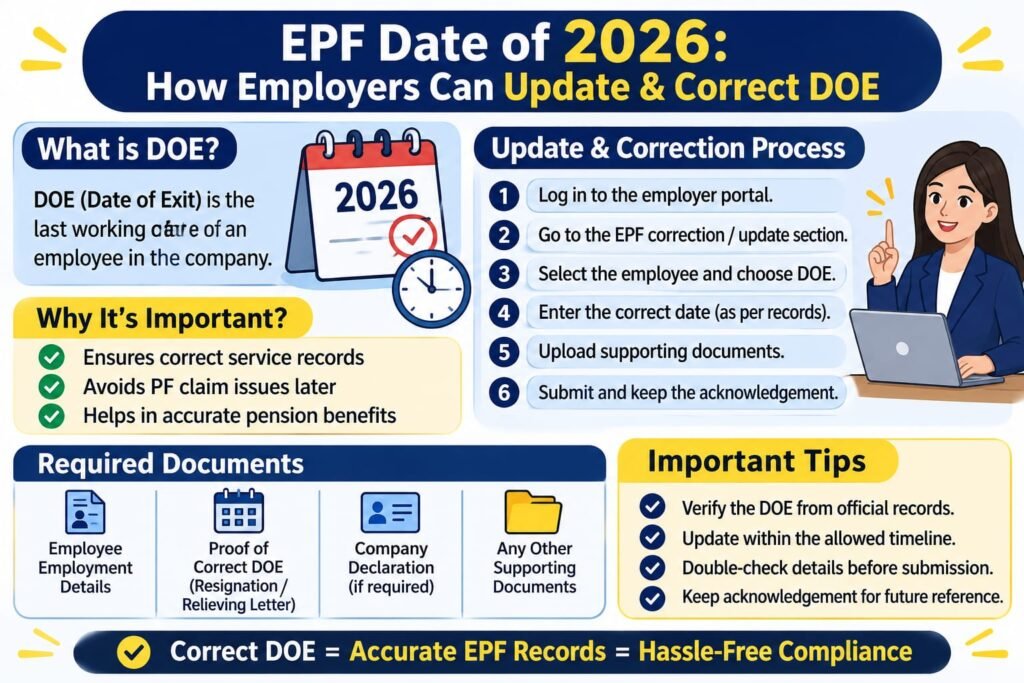
The EPF Date of Exit (DOE) is the date on which an employee’s EPF-covered employment with an establishment ends.
It should be distinguished from the employee’s Date of Joining:
- Date of Joining (DOJ): Date on which the employee joined the establishment.
- Date of Exit (DOE): Date on which the employee’s employment ended.
- Reason for Leaving: The applicable reason for the employee’s separation.
The employer should ensure that these details match the organisation’s HR, payroll and employment records.
2.Why is EPF Date of Exit Important?
A correct DOE is important because it forms part of the employee’s EPFO service history.
An incorrect or missing DOE may result in:
- Difficulty with PF transfer to a new employer
- Incorrect service history under the UAN
- ECR-related issues
- Problems with certain EPF claims
- Mismatch between employment and EPFO records
- Difficulties when correcting or updating other member details
Therefore, employers should update the employee’s exit information accurately and within the applicable EPFO process.
3.When Should an Employer Update Date of Exit?
An employer generally needs to ensure that the employee’s exit details are updated after the employee leaves the establishment.
Before updating the DOE, the employer should verify:
- Employee’s actual last working date
- Final attendance records
- Salary and wage records
- PF contribution records
- Resignation or termination documents
- Full and final settlement records
- Reason for leaving
The date submitted to EPFO should be consistent with the employer’s official records.
4.How Employers Can Update EPF Date of Exit in 2026
The process depends on whether the Date of Exit is missing or whether an incorrect DOE has already been recorded.
Step 1: Verify the Employee’s Exit Date
The employer should first confirm the employee’s actual last working date from the company’s records.
For example:
Last working day: 31 August 2026
The employer should ensure that the EPFO exit information corresponds with the actual employment records.
Step 2: Check the Employee’s EPFO Record
The employer should verify the employee’s Member ID and existing service details.
If the DOE is already available, check whether it matches the company’s records.
If the DOE is missing, the employer should follow the applicable EPFO exit-update process.
Step 3: Verify the Reason for Leaving
The employer should also ensure that the correct Reason for Leaving is recorded.
The reason should correspond with the employee’s actual separation, such as resignation, retirement or termination, as applicable.
Step 4: Process the Correction or Update
If the employee’s profile correction request is routed to the employer, the employer should review the request through the employer-side EPFO functionality.
The employer should compare the requested change with the company’s records before approving or rejecting the request.
Step 5: Check Supporting Documents
Depending on the correction, supporting documents may be required.
Useful documents can include:
- Resignation letter
- Termination letter
- Experience certificate
- Salary or wage records
- Full & final settlement records
- Attendance records
- Employer letter
- Other relevant employment records
Step 6: Approve the Request Where Applicable
After verifying the information, the authorised employer representative can process the request through the applicable EPFO employer portal functionality.
If the information is incorrect or unsupported, the employer should not approve the correction without verification.
Step 7: Confirm the Updated Record
After the correction/update is processed, the employer should verify that the employee’s EPFO service record reflects the appropriate Date of Exit.
This helps avoid future problems involving PF transfer and employment-history verification.
5.What If the EPF Date of Exit Is Incorrect?
Sometimes an employee may discover that an incorrect DOE has already been recorded.
For example:
Actual last working date: 31 August 2026
DOE recorded in EPFO: 31 July 2026
In such a case, the employer should verify the employee’s payroll, attendance and employment records and follow the applicable EPFO correction procedure.
The employer should not simply change the date without checking the supporting records.
For cases involving an already-recorded incorrect Date of Leaving, the applicable Joint Declaration/correction process may be required.
6.EPF Date of Exit and Joint Declaration
A Joint Declaration (JD) is used for certain corrections in EPFO member records.
Where the Date of Leaving requires correction and the case falls under the applicable JD process, the employer and employee may need to provide the required information and supporting documentation.
The exact requirements can depend on the nature of the correction and the member’s EPFO record.
Employers should therefore check the current EPFO requirements before submitting a correction.
7.Can Employees Update Their Own Date of Exit?
Yes, in eligible situations.
EPFO simplified its member-profile updation process in 2025. Aadhaar-validated UAN members can update several profile details themselves in eligible cases, including certain Date of Joining and Date of Leaving corrections.
This means that an employer does not necessarily have to process every DOE correction manually.
However, cases that require employer certification or fall under specific correction procedures may still require employer involvement.
8.Documents Employers Should Maintain
For proper compliance, employers should maintain records supporting an employee’s separation.
Document | Purpose |
Resignation Letter | Confirms employee resignation |
Termination Letter | Supports employer-initiated separation |
Experience Certificate | Helps establish employment period |
Salary/Wage Records | Verifies employment and contribution period |
Attendance Records | Helps verify last working date |
Full & Final Settlement | Supports separation date |
Employer Letter | May support specific correction cases |
Maintaining these records can also help the employer respond to future EPFO queries.
9.Common EPF Date of Exit Mistakes
- Entering the Wrong Exit Date
The DOE should always be checked against the employee’s actual employment records.
- Ignoring a Missing DOE
A missing Date of Exit can affect the employee’s service history and subsequent PF-related processes.
- Approving an Incorrect Correction
Employers should verify every correction request before approval.
- Not Checking ECR Records
The exit date should be considered along with the employee’s contribution records.
- Using Unsupported Information
A correction should be based on genuine employment records rather than assumptions.
- Not Checking the Final Record
After processing a correction, employers should verify that the change has been properly reflected.
10.EPF Date of Exit and ECR
The Date of Exit has become particularly important with EPFO’s revamped Electronic Challan cum Return (ECR) system.
ECR validations use employment-related information recorded with EPFO. Therefore, an incorrect exit date can create inconsistencies when contributions are being reported for a period that falls outside the recorded employment period.
Employers should therefore ensure that the DOE and contribution records remain consistent.
11.Employer Checklist for EPF DOE Correction
Before updating or approving a Date of Exit correction, employers should check:
- ✔ Actual last working date
- ✔ Employee’s resignation/termination records
- ✔ Attendance records
- ✔ Last PF contribution period
- ✔ Existing EPFO Date of Exit
- ✔ Reason for leaving
- ✔ Employee’s correction request
- ✔ Supporting documents
- ✔ ECR records
- ✔ Final EPFO service history
Need help with ITR filing or PF withdrawal?
Talk to an Expert →